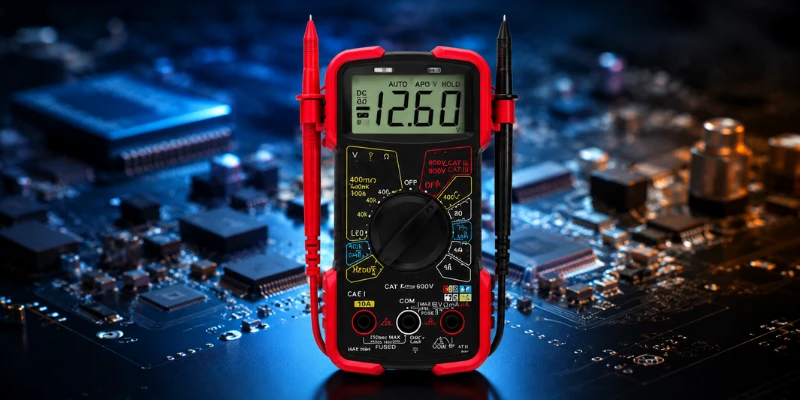
Introduction to the Innova 3320 Multimeter
The Innova 3320 Auto-Ranging Digital Multimeter is a versatile tool designed for a wide range of electrical diagnostics. Whether used by professionals or hobbyists, this multimeter provides accurate readings with its user-friendly interface, making it an essential device for anyone involved in electrical work. One of the distinguishing features of the Innova 3320 is its auto-ranging capability, which automatically adjusts the measurement range to the electrical quantity being tested, eliminating the need for manual range selection.
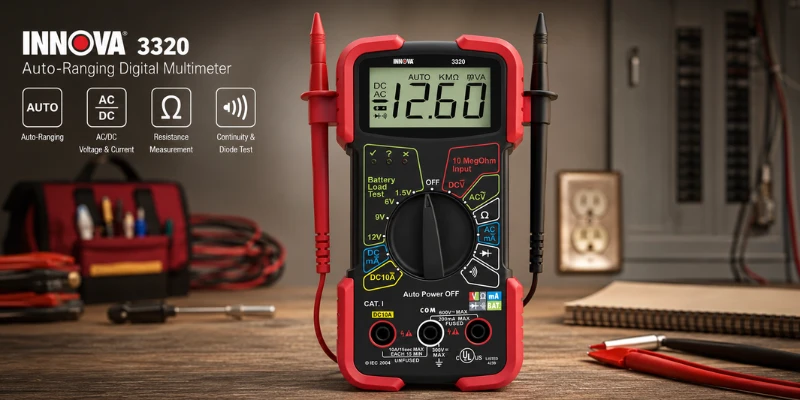
Equipped with a large, backlit LCD display, the Innova 3320 ensures easy readability even in low-light conditions. It measures various electrical parameters, including voltage, current, and resistance. The multimeter can measure both alternating current (AC) and direct current (DC), supporting a variety of applications from simple household wiring inquiries to complex electrical troubleshooting. The device also has a built-in diode tester and continuity tester, providing additional functionalities that further enhance its diagnostic capabilities.
Another notable feature of the Innova 3320 is its safety. It complies with CAT III 600V safety standards, allowing users to conduct their tests with confidence. This attribute is especially important for those working on live circuits, as it minimizes the risks associated with electrical testing. The sturdy design and rubberized casing also add to the device’s durability, making it suitable for both in-field and workshop environments.
In summary, the Innova 3320 Auto-Ranging Digital Multimeter combines functionality, safety, and ease of use, establishing itself as a reliable choice for anyone needing precise electrical measurements. From diagnostic work to everyday use, its robust features and specifications make it an indispensable tool in the toolkit of both professionals and DIY enthusiasts alike.
INNOVA 3320 How to Use: A Beginner’s Guide
The INNOVA 3320 Auto Ranging Digital Multimeter, Red & Black is a reliable and beginner-friendly diagnostic tool designed for measuring voltage, current, resistance, and battery condition with ease. Its auto-ranging feature automatically selects the correct measurement range, eliminating guesswork and making electrical testing faster and more accurate. The large digital display, durable protective rubber corners, and color-coded LED indicators help users perform safe and efficient troubleshooting for automotive, household, and electronic applications. If you’re looking for a simple step-by-step guide on innova 3320 how to use, understanding its dial settings, test leads, and measurement functions will help you get accurate readings while ensuring safe operation.
Getting Started with the Innova 3320
To begin utilizing the Innova 3320 Auto-Ranging Digital Multimeter effectively, it is essential to start with the unboxing process, which sets the stage for a successful experience. Upon receiving the multimeter, carefully remove it from its packaging. Inside, you will typically find the multimeter itself, a set of test leads—a pair of insulated wires with probes for measuring voltage and current—along with a user manual that provides essential guidance for operation.
Acquainting yourself with the various buttons and displays on the Innova 3320 is crucial for its proper use. At the front, you will notice a digital display that shows measurements for voltage, current, and resistance. The multimeter is equipped with several buttons, including the range selector, which allows users to choose between manual and auto-ranging modes. Familiarizing yourself with these elements will enhance your ability to navigate the device efficiently, as different measurements require different settings.
Before using the multimeter for any electrical tests, it is important to install the necessary batteries. Open the battery compartment located on the back of the device; this usually requires unscrewing a small screw or pressing a latch. Insert the recommended battery type, which is typically a 9V battery, ensuring that it is correctly oriented to match the polarity indicators within the compartment. After securely closing the battery compartment, the multimeter is now ready for use. Having a foundational understanding of your Innova 3320, from unboxing to battery installation, will facilitate its effective utilization for various measurement tasks.
Understanding Auto-ranging Feature
The Innova 3320 Auto-Ranging Digital Multimeter is equipped with a sophisticated auto-ranging feature that streamlines the measurement process by automatically selecting the appropriate measurement range. This functionality is particularly advantageous for both novice and seasoned users, as it eliminates the confusion and guesswork associated with manually setting measurement ranges. In traditional multimeters, users often needed to analyze the expected value of the measurement to choose a suitable range, which could lead to errors or inaccuracies if the wrong setting was applied. With the Innova 3320, those hurdles are addressed seamlessly.
When a measurement probe is connected, the multimeter begins by scanning across its measurement ranges to identify the most suitable one for the input signal, whether it is measuring voltage, current, or resistance. This automatic selection ensures that the user receives accurate readings without the need for prior calculations or adjustments. Such efficiency is very useful when switching between different types of measurements, especially in dynamic settings such as electrical troubleshooting or circuit analysis.
Auto-ranging is particularly beneficial in cases where the expected measurement values are uncertain, such as when working on new or unfamiliar equipment. For instance, measuring the voltage of a fluctuating power supply might yield values that are in a wide range. The multimeter will adapt by selecting a wider range initially and will refine its setting to provide precise readings as needed. This adaptability enhances user confidence in the precision of their measurements and reduces the likelihood of miscommunication in collaborative situations where multiple individuals may interpret measurement data differently.
Ultimately, the auto-ranging feature of the Innova 3320 not only saves time but also improves measurement accuracy, making it an essential function for effective electrical measurements.
Basic Functions of the Innova 3320
The Innova 3320 Auto-Ranging Digital Multimeter is an essential tool for both professionals and hobbyists alike, allowing for precise measurement in various electrical components. This device encompasses several fundamental functions including measuring voltage, current, resistance, and continuity, making it versatile for troubleshooting electrical issues.
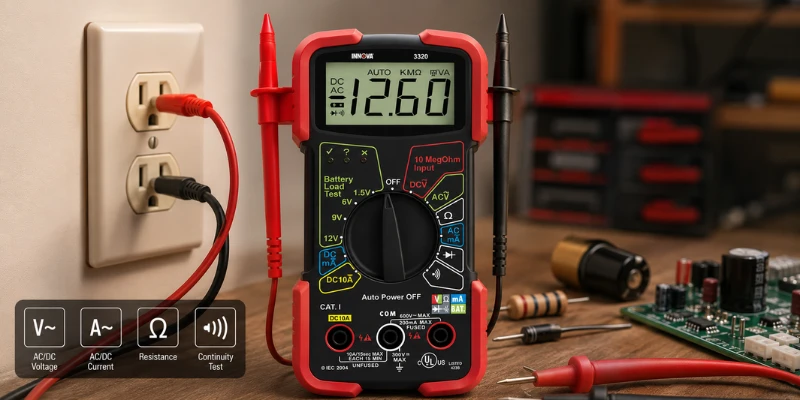
First, the voltage measurement feature supports both alternating current (AC) and direct current (DC). To measure AC voltage, simply select the AC mode on the multimeter and connect the probes to the circuit. For instance, when testing the voltage of a household outlet, insert the black probe in the COM jack and the red probe in the VΩ jack. The multimeter will then display the voltage reading on its screen, providing an accurate measurement of the electrical supply.
Next, the Innova 3320 also measures current, with capabilities for both AC and DC as well. Measuring current requires setting the device to the appropriate mode and positioning the probes in series with the circuit. For example, to measure the DC current flowing through a battery circuit, ensure the multimeter is in the DC mode, then connect the black lead to the negative terminal and the red lead to the positive terminal of the circuit, observing the readout for accurate current flow.
Resistance measurement is another key function. By selecting the resistance mode and connecting the probes to the resistor or conductor, the multimeter can indicate the resistance in ohms (Ω). This function is particularly useful for assessing the integrity of electrical components or connections.
Finally, the continuity test helps in diagnosing circuit paths. When the probes touch two points in a circuit that are connected, the multimeter will emit a tone, signaling a continuous path. This feature is critical in verifying connections and ensuring that electrical circuits function properly.
How to Measure Voltage with the Innova 3320
Measuring voltage is a fundamental function of the Innova 3320 Auto-Ranging Digital Multimeter. To begin, ensure that you follow safety protocols to prevent any electrical hazards. Always wear appropriate personal protective equipment (PPE) such as safety goggles and insulated gloves when working with electrical circuits.
To measure voltage, first, identify whether you need to measure alternating current (AC) or direct current (DC) voltage. The Innova 3320 has separate settings for these types. Start by turning the multimeter’s dial to the appropriate voltage setting: use the “V~” setting for AC voltage and the “V-” setting for DC voltage. It’s crucial to select the range correctly if you’re working with devices that may exceed the multimeter’s rating.
Next, connect the test leads to the multimeter. Insert the black lead into the COM (common) jack and the red lead into the VΩmA jack. After connecting the leads, carefully touch the probes to the points within the circuit where you want to measure voltage. For DC applications, connect the red probe to the positive terminal and the black probe to the negative. For AC circuits, polarity does not matter; thus, you can place the probes on either side of the live circuit.
Once the probes are securely in place, look at the display on the Innova 3320. The reading will show the voltage in volts (V). If the display reads “OL,” this indicates that the voltage exceeds the selected range; adjust the range accordingly for an accurate reading. Recording these measurements is critical for troubleshooting or confirming functionality in electrical systems.
By following these steps, you can effectively and safely measure both AC and DC voltage with the Innova 3320. Consistently applying these practices ensures reliable results and promotes safe electrical work.
How to Measure Current with the Innova 3320
Measuring current using the Innova 3320 Auto-Ranging Digital Multimeter is a process that involves several important steps and precautions to ensure accurate readings. The device is capable of measuring both AC and DC current, making it versatile for various applications. To begin, ensure that the multimeter is set to the appropriate mode for current measurement. This can typically be done by turning the dial to the “A” setting for amperage, with additional options for AC or DC indicated accordingly.
Before proceeding, it is crucial to understand the connections involved. For measuring current, the multimeter must be inserted in series with the circuit. Therefore, it is essential to turn off the power to the circuit before making any connections to avoid potential short circuits or damage. Once the connections are secure, you can restore power and begin your measurement.
Upon applying power, the display will show the current passing through the circuit. It is vital to observe the polarity when measuring DC current; the red probe should be connected to the positive side and the black probe to the negative side of the circuit to obtain accurate readings. For AC measurements, probe orientation is not a concern. The Innova 3320 provides both numerical values and an analog bar graph for additional context about the current level.
When interpreting the readings, keep in mind that variations in current can occur due to changes in load or electrical demand. If the current exceeds the multimeter’s rated capacity, it may cause a fuse to blow, requiring replacement. Always refer to the user manual for details on the device’s limitations and operational guidelines. Effectively measuring current with the Innova 3320 enhances your understanding of electrical circuits and contributes to safer handling of electronics.
How to Measure Resistance and Continuity
Measuring resistance and checking for continuity are essential functions of the Innova 3320 Auto-Ranging Digital Multimeter. These capabilities allow users to detect circuit integrity and analyze components effectively. Here’s a step-by-step guide for utilizing this tool to measure resistance and continuity.
First, begin by ensuring that the multimeter is powered on. Rotate the selector dial to the mode that indicates resistance, typically denoted by the “Ω” symbol. This sets the multimeter to measure resistance in ohms. For continuity testing, some models feature a dedicated setting that may resemble a sound wave symbol or a diode symbol.
Next, prepare to measure resistance. Connect the test leads: insert the black probe into the COM port and the red probe into the VΩmA port. It is crucial to remove power from the circuit you are testing to avoid damage to the multimeter and ensure accurate readings. Touch the probes to the ends of the resistor or circuit component you wish to measure. The display will show the resistance value in ohms, providing immediate feedback.
For continuity testing, reconnect the leads as described earlier. Ensure the circuit is unpowered. Touch the probes to the two points you wish to check. If the circuit has continuity, the multimeter will emit a beep, and the display will reflect a very low resistance, typically close to zero ohms. If there is no continuity, the display will indicate an open circuit, usually reading as ‘OL’ (over limit).
These functionalities hold various practical applications, including troubleshooting electrical circuits, testing wire integrity, and verifying component health such as resistors and connectors. Mastering resistance measurement and continuity checks with the Innova 3320 Digital Multimeter enhances diagnostic capabilities in electrical work.
Common Troubleshooting Tips
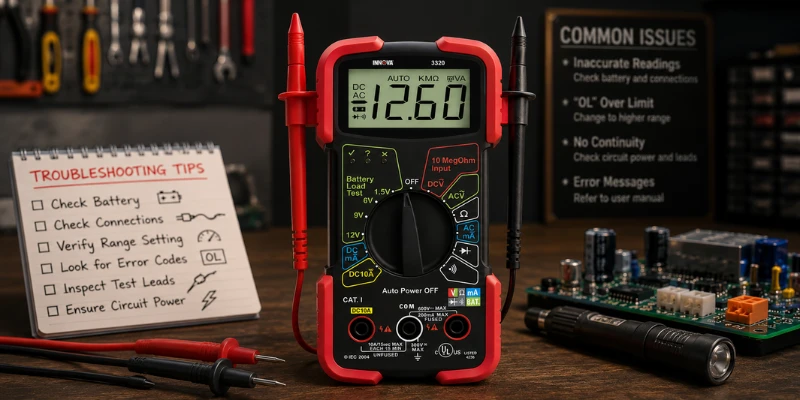
When utilizing the Innova 3320 Auto-Ranging Digital Multimeter, users may occasionally encounter various issues that can hinder precise measurements. Familiarity with common troubleshooting techniques can enhance the user experience and ensure that the device functions correctly. One prevalent issue involves inaccurate readings. This can result from a low battery, which hampers the multimeter’s performance. Users should regularly check the battery and replace it as needed to maintain optimal functionality.
Another issue commonly reported is a persistently displayed error message. For instance, if the multimeter shows an “OL” (Over Limit) error, it indicates that the measurement exceeds the device’s range. In such cases, adjusting the selected range or switching to a higher range mode is advisable. Additionally, if the device shows no continuity when testing a circuit, it may signal a lack of power in the circuit or a defective cable. Ensuring the circuit is powered and inspecting the leads for damage can resolve this problem.
Users should also familiarize themselves with the user manual, which contains important information regarding error codes and troubleshooting guidelines specific to the Innova 3320. This resource can be invaluable in understanding the device’s indicators and settings. Moreover, ensuring proper lead connection is critical; improperly connected leads can lead to erroneous readings. Therefore, always confirm that the leads are securely connected to both the multimeter and the component being tested.
In conclusion, using the Innova 3320 effectively requires some troubleshooting knowledge. Understanding error messages, maintaining the device, and checking basic connections can ensure accurate readings and extend the multimeter’s lifespan.
Conclusion and Best Practices
In summary, utilizing the Innova 3320 Auto-Ranging Digital Multimeter can significantly enhance your electrical measurement tasks. By following the fundamental principles outlined in this guide, users can ensure accurate readings while maintaining safety protocols. One of the best practices is to always begin by familiarizing oneself with the multimeter’s functions, including voltage, current, and resistance measurement modes. This understanding aids in selecting the correct settings for various applications.
It is also paramount to keep the multimeter in good condition. Regular inspections of the leads for damage or wear can prevent inaccurate readings and ensure safety during usage. Users should remember to set the multimeter to the appropriate range, particularly when measuring voltage or current, to avoid overwhelming the device and potentially causing damage. If unsure about the appropriate setting, it is advisable to start at the highest range and work downwards to ensure accurate measurements.
For those who become more comfortable with the multimeter, exploring its advanced features can provide additional benefits. Understanding functions such as continuity testing, diode testing, and advanced frequency measurements can expand the capabilities of the Innova 3320, making it a versatile tool for both novice and experienced users alike.
As you progress in your skills with the Innova 3320, continue to educate yourself on electrical system safety and best practices in your measurements. This not only enhances your effectiveness as a user but also promotes a safer working environment for everyone involved. Embrace the journey of learning and keep exploring the features of your digital multimeter to fully leverage its potential.
FAQs
What is an auto-ranging multimeter?
An auto-ranging multimeter automatically selects the appropriate range for the measurement being taken, simplifying the process and reducing the likelihood of errors.
How accurate is the INNOVA 3320 Auto Ranging Digital Multimeter?
The INNOVA 3320 is highly accurate, making it suitable for both household and professional use. It provides precise measurements for voltage, current, and resistance.
Can the INNOVA 3320 measure temperature?
No, the INNOVA 3320 does not have the capability to measure temperature. It focuses on electrical measurements such as voltage, current, and resistance.
Is the INNOVA 3320 suitable for professional use?
Yes, the INNOVA 3320 is suitable for professional use. Its accuracy and reliability make it a valuable tool for various professional applications.
What should I do if my multimeter stops working?
If your INNOVA 3320 stops working, first check the batteries and replace them if necessary. If the problem persists, refer to the troubleshooting section of the user manual or contact INNOVA customer support for assistance.


